
IM Work Notifications & Link-Based Approval
What problem it solves
Approval systems rarely die from missing features — they die because approvals sit inside the system while people don't. To-dos pile up unseen, requests stall for a day in someone's queue, finance chases, submitters wait, and someone ends up forwarding screenshots in a group chat.
| Common pitfall | How GFlow handles it |
|---|---|
| To-dos live only inside the system; no ping, no action | Approval events are pushed as work notifications straight to the assignee's DingTalk / WeCom / Feishu |
| Tapping a notification still demands a login, worse on mobile | The card link lands on the form without signing in — silent in-app login for DingTalk / WeCom containers |
| Group-bot broadcasting puts approval links in a group — first tap wins, and nobody can tell who acted | Messages are targeted to one person; links carry a one-time ticket that dies when forwarded, and every action is taken inside the system with a full audit trail |
| IM accounts and system accounts are two worlds, kept in sync by hand | Directory sync pulls the org tree automatically and binds members by mobile number; leavers are disabled automatically, re-running sync re-binds fixed records |
| Three platforms, three protocols, three sets of credentials and rate-limit traps | One admin page for all credentials, effective immediately; built-in retries and rate limiting |
| Messages vanish into the void — did anyone get it? | Every outbound message has a delivery record (sent / failed / skipped); failures retry automatically with the platform error surfaced |
Keep the habits, keep the data
- Zero learning curve for employees: the approval entry lives inside DingTalk / WeCom / Feishu — no new app, no new password, no training. The notification arrives, they tap, they act. Work as usual.
- Data stays on your servers: gflow is a self-hosted system — forms, attachments and audit trails never leave your machines. IM is just the doorbell: messages carry only the title and an action link; business details stay inside by default.
- No IM lock-in: one configuration model for all three platforms. Switch from DingTalk to Feishu tomorrow and your workflows and documents stay untouched.
Capability matrix
| DingTalk | WeCom | Feishu | |
|---|---|---|---|
| Notification form | Work notification (card, whole-card link) | App message (card) | Bot message card |
| Directory sync | ✅ departments + members (incl. mobile) | ✅ departments + members (mobile via reverse lookup) | ✅ departments + members (incl. mobile) |
| In-container login | ✅ silent | ✅ silent (requires an ICP-filed trusted domain) | via ticket link |
| Per-tenant credentials | ✅ | ✅ | ✅ |
Only one IM platform is active at a time (pick one of three, switch anytime — enabling a new platform automatically disables the current one and keeps its data); the two items under "Your own systems" enable independently. With no channel configured, outbound delivery stays off and in-app notifications are unaffected.
How it works
- Targeted to a person: each notification is delivered individually to the recipient's bound identity (DingTalk userid / WeCom userid / Feishu open_id). Unbound recipients are skipped on that channel; in-app notifications are unaffected.
- Link safety: the embedded ticket is bound to the recipient, single-use, valid for 7 days — forwarded links simply don't open.
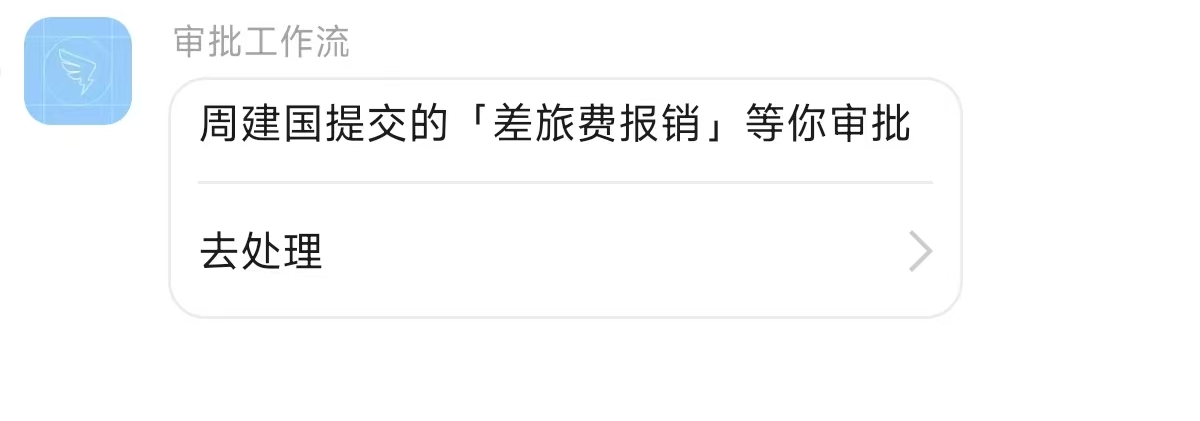
- Restrained content: only the title and the action link go into the IM. Business details (amounts, reasons) stay out by default and can be opted in.
Enable it in three steps
DingTalk or Feishu is the quickest start (about 5–8 minutes each, no domain needed); WeCom messaging is just as easy, but its in-card login-free access needs an ICP-filed domain — configure WeCom last if you go that far.
Step 1: create the enterprise app and grant permissions
DingTalk (about 5 minutes)
- Sign in to the DingTalk developer console open-dev.dingtalk.com → App development → Internal development → Create app.
- On the "Credentials & basic info" page, collect AppKey, AppSecret, AgentId; CorpID sits under "Enterprise info" in the top-right corner (it is not the AppKey).
- In "Permission management", search and enable:
| Permission (official name) | Used for |
|---|---|
| Address book department info read | department sync |
| Address book department member read | member sync |
| Member info read | member details |
| Employee mobile number | returns mobile numbers — without it nobody can auto-bind |
| Personal identity info | account binding |
- Work notifications and in-container login are enabled by default for internal enterprise apps — nothing to apply for.
WeCom (about 8 minutes)
- Sign in to the WeCom admin console work.weixin.qq.com → App management → Self-built → Create app; collect AgentId and the app Secret (viewing it sends the value to the WeCom mobile app).
- My company → Enterprise info → copy the enterprise ID (CorpID).
- Set the app's visible range to everyone: directory reads and messaging are both bounded by it — an unopened range is the most common cause of "0 people synced / messages not delivered".
- Permissions: self-built apps are callable by default, no per-scope grants needed; leave gflow's "directory Secret" empty (that Secret mandates a trusted IP and only adds a failure point).
- Trusted IP: if API calls fail with 60020, add the gflow server's outbound IP to the app's "trusted IP" list (the entry unlocks after a receive-message URL or trusted domain is configured).
- In-card login-free access (optional): set a trusted domain under "Web authorization & JS-SDK" — the domain must be ICP-filed and pass ownership verification (upload the verification file to the domain root); IP addresses and intranet hosts won't work. Skip it if you have no filed domain — messaging is unaffected and links fall back to password login.
Feishu (about 8 minutes)
- Sign in at open.feishu.cn, open the developer console → create a custom enterprise app; collect App ID, App Secret on the "Credentials & basic info" page.
- App capabilities → Add capability → add the bot (messaging fails with 230006 without it).
- In "Permission management", search and enable:
| Permission (official name) | Used for |
|---|---|
Get basic contact info contact:contact.base:readonly | department & member sync |
Get user phone number contact:user.phone:readonly | returns mobile numbers — without it nobody can auto-bind |
Get & send single/group messages im:message | bot message cards |
- App release → Availability → set to all employees, then Version management → create a version and apply to publish (self-built apps are approved by your own enterprise admins — usually the creator). Without publishing, none of the permissions take effect (errors 230013 / 40004).
Step 2: enter credentials in GFlow
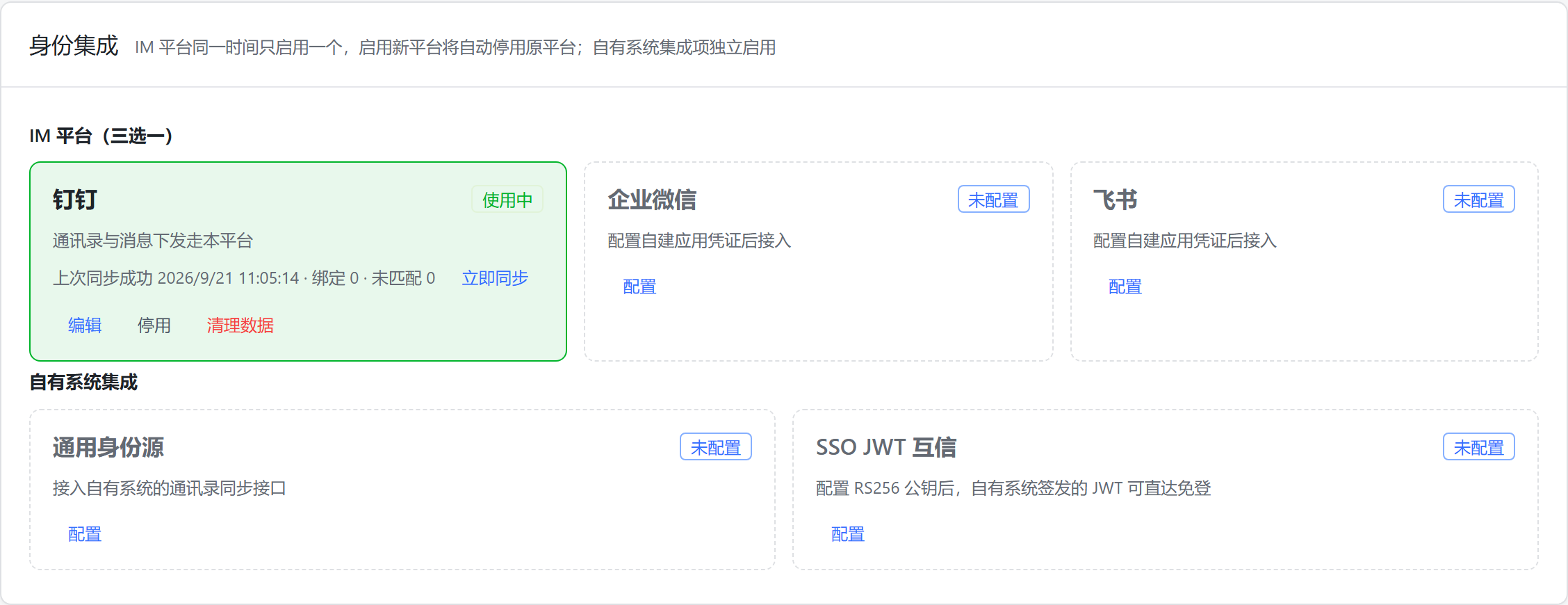
Sign in to GFlow → System Management → IM Integration → the "Identity integration" card → the "IM platforms (pick one of three)" group → click Configure on an unconfigured platform card (or Edit on a configured one), fill in per the table below and save.
| gflow field | DingTalk | WeCom | Feishu |
|---|---|---|---|
| CorpID | enterprise CorpId | enterprise ID | — |
| AppKey | AppKey | — | — |
| AgentID | AgentId | AgentId | — |
| App ID | — | — | App ID |
| AppSecret | AppSecret | app Secret | App Secret |
| Directory Secret | — | leave empty | — |
| API base URL | empty (official) | empty (official) | empty (official) |
- Takes effect immediately, no restart. Secrets are write-only — leaving them blank keeps the stored value; the remaining switches can stay at their defaults.
- Pick one of three: only one IM platform is active at a time. Saving or enabling a new platform while another one is in use asks for a switch confirmation — after confirming, the previous platform is disabled automatically, directory sync and messaging move to the new platform, and the previous platform's synced departments, accounts and bindings are kept; once you no longer need them, use "Purge data" on its card.
Card states and buttons:
| Card state | Meaning | Actions on the card |
|---|---|---|
| Not configured (dashed) | no credentials yet | Configure (opens the drawer) |
| Disabled | configured but not enabled | Edit / Enable / Purge data |
| Active (green) | the platform currently in effect | Sync now / Edit / Disable / Purge data |
- Enable: puts the platform to work; if the secret is missing you'll be prompted to fill it first — otherwise sync and notifications won't work.
- Disable: stops that platform's directory sync and message delivery; everything already synced (departments, accounts, bindings) is kept.
- Purge data: removes user bindings synced from that platform and disables its synced departments and auto-provisioned accounts (historical approvals are untouched); a re-sync rebuilds them from the current org chart.
- Tenant isolation: each tenant sees and configures only its own credentials on this page — there is no globally shared default configuration, and tenants cannot see each other's setups.
Step 3: sync the directory, bind automatically
On the active platform card (the green "Active" one), click Sync now; the summary line on the card shows the time and result of the latest run.
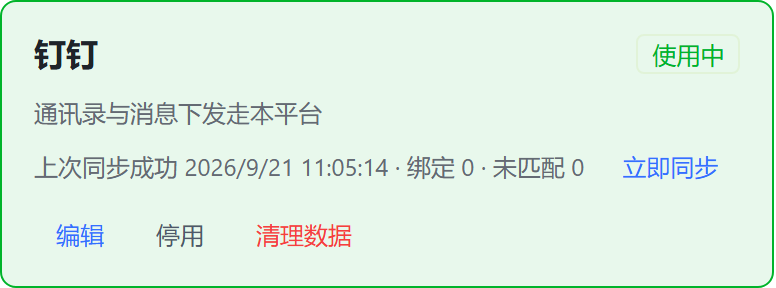
Re-running a sync resets all counters to zero — sync is idempotent and never duplicates data.
- Pulls the full org tree and members and binds automatically by mobile number; unmatched counts are shown in the sync result.
- Unmatched > 0: fill in the user's mobile number under System Management → Organization → run sync again (idempotent, safe to re-run).
- A full sync runs automatically every night; leavers are disabled (never deleted — historical documents keep their references).
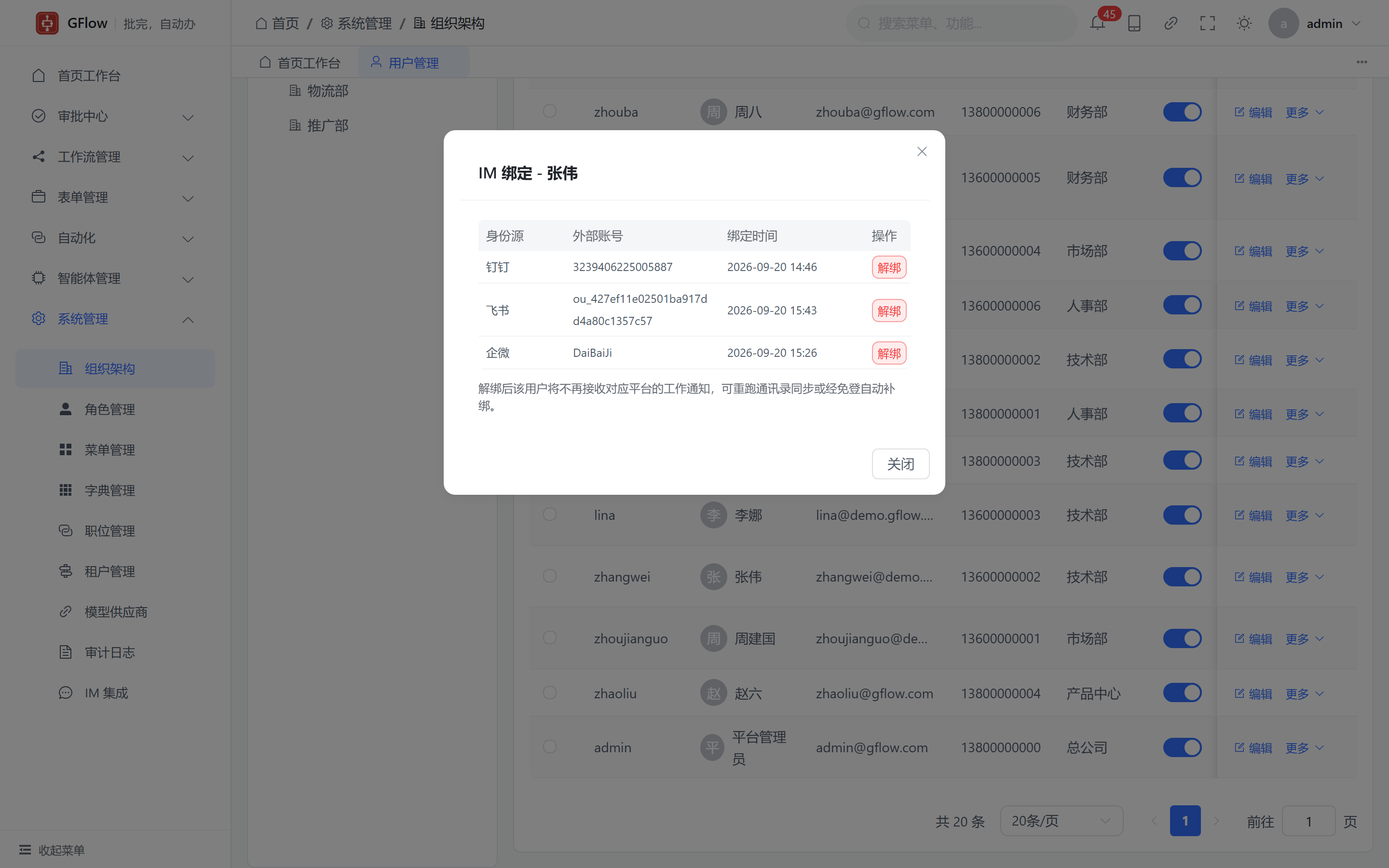
Binding management: System Management → Organization → a user's "More → IM bindings" shows the binding status and allows unbinding. An unbound user stops receiving that platform's work notifications; re-running sync or a login-free visit re-binds automatically.
The "Generic directory source" card under "Your own systems" connects your own account system — see below.
Once bound, the next approval event lands in the member's IM:
Free login: tap and act
| Scenario | Login method |
|---|---|
| Tapping a card inside DingTalk | Silent in-container login |
| Tapping a card inside WeCom | Silent OAuth (requires an ICP-filed trusted domain in the WeCom console) |
| Feishu / browsers / everything else | One-time ticket link, works on all three platforms |
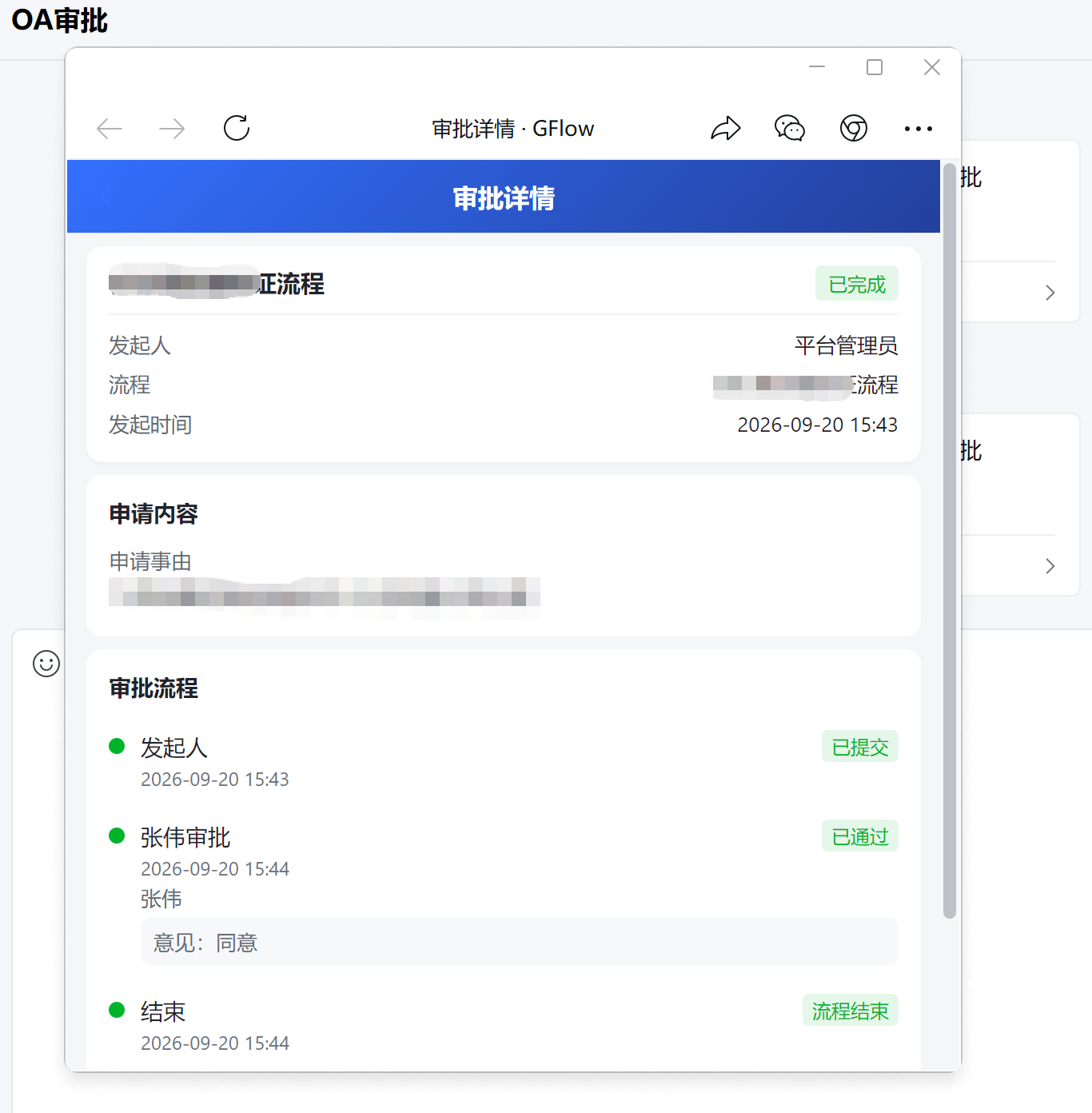
After landing, the page follows the device: mobile opens the mobile detail page, desktop opens the desktop app. Approval actions must happen inside the system — the card only carries an "Open" button, so every action stays attributable.
Reliability
- Delivery visibility: one delivery record per outbound message — sent / failed / skipped (unbound).
- Automatic retries: failed sends retry up to 3 times with a fresh link; in-app notifications and the approval flow are never blocked.
- Rate limiting: client-side limits per platform quota, so bulk reminders never trip platform bans.
- Multi-replica deployments: background sync and retry jobs run on one leader; config changes propagate across replicas in seconds.
Troubleshooting
| Symptom | Cause & fix |
|---|---|
| Switching platforms (e.g. DingTalk → Feishu) | Enter credentials on the target platform's card and click Enable; after confirming the switch the previous platform is disabled automatically with its synced data kept — purge it from its own card once you no longer need it |
| Sync succeeds but "unmatched" equals everyone | Mobile-number permission not granted (DingTalk "employee mobile number" / Feishu "user phone number") — the platform returns no numbers |
| WeCom syncs 0 people / messages report invaliduser | WeCom app visible range not set to everyone |
| WeCom error 60020 not allow to access from your ip | Trusted IP not configured on the WeCom app (prerequisite: a receive-message URL or trusted domain first) |
| WeCom error 60111 | Mobile-number reverse lookup found nobody: the member is outside the app's visible range, or the number differs from the WeCom directory |
| WeCom login-free access reports redirect_uri / 50001 | The visiting domain doesn't exactly match the "Web authorization & JS-SDK" trusted domain: it must be ICP-filed and identical to the configuration (no port) |
| Feishu error 230006 | Bot capability not added |
| Feishu error 230013 / 40004 | Recipient or department outside the app's availability scope; data scope not opened or app not published |
| DingTalk reports success but nobody received it | DingTalk async sends don't validate recipients — check the userid is inside the app's visible range |
Connect your own system: generic directory source (optional)
Is your org chart not in DingTalk / WeCom / Feishu but in your own system? Use the generic directory source: your system exposes one read-only "directory snapshot" endpoint, and gflow pulls it on a schedule (gflow makes outbound calls only; no new inbound endpoints are opened). Departments, members, phone-number auto-binding, nightly sync, offboarding by disable-not-delete — the exact same machinery as the three IM platforms.
Endpoint contract: a single GET returning the full JSON snapshot, authenticated with a Bearer token:
GET https://your-system.example.com/api/directory-snapshot
Authorization: Bearer <token>

{
  "departments": [
    {
      "external_id": "d1",
      "parent_external_id": "",
      "name": "HQ",
      "sort_order": 1
    },
    {
      "external_id": "d10",
      "parent_external_id": "d1",
      "name": "Engineering",
      "leader_external_id": "u1"
    }
  ],
  "users": [
    {
      "external_id": "u1",
      "name": "Alice",
      "mobile": "13800000001",
      "department_ids": ["d10"]
    },
    {
      "external_id": "u2",
      "name": "Bob",
      "department_ids": ["d10", "d20"]
    }
  ]
}| Field | Notes |
|---|---|
external_id | Department/user ID in your system; the binding key — must be stable and unique |
parent_external_id | Parent department ID; empty = top level. Any ordering works; a cycle or a missing parent fails the whole run (no partial data) |
leader_external_id | Department head (optional); backfills the gflow department leader via the binding |
mobile | Phone number (optional); present numbers auto-bind matching gflow users, missing ones can be auto-provisioned |
department_ids | Departments the member belongs to (multiple allowed); the first is the primary position; empty = directly under the company root |
On the "Generic directory source" card under "Your own systems", click Configure and enter the snapshot URL and access token; everything else matches the platform syncs (snapshot cap 16MB; oversized or failing responses fail the whole run and skip disabling, so existing users are never hurt by a glitch).
Bindings created by this sync are immediately usable by JWT mutual trust login (next section) — no manual binding import needed.
Issue logins from your own system (optional)
Beyond IM login-free access, your own systems can use JWT mutual trust: sign a short-lived JWT with an RS256 private key (sub = user ID, aud = gflow, TTL ≤ 5 minutes), and gflow verifies it with the public key entered on the "SSO JWT Trust" card. The endpoint is POST /api/v1/auth/exchange/trusted.
Binding precedence: an explicit user_bindings row (provider = jwt-trust) wins; without one, gflow falls back to the binding created by the generic directory source sync — combined with the previous section, a customer system only needs the snapshot endpoint plus the public key, and org chart, account bindings and login all come together automatically.