
AI pre-screens · Humans approve ·automation follows.
GFlow Workflow Platform
AI pre-screens: LLMs judge the risk; low-risk items pass straight through
Humans approve: countersign, add-sign, return anywhere — every Chinese-style approval action
Automation follows: the moment it is approved, booking, notifications and ERP write-back run on rule chains
Built on the Apache-2.0 open-source GFlow Engine (on a RuleGo base), with the GFlow Workflow Platform on top providing process, form, rule chain and AI agent designers.
Watch GFlow run end to end
Start an expense request, watch the amount pick the approval chain, the manager and finance sign in turn, and the admin dashboard close the loop — recorded live from the demo environment.
An open-source core, ready for commercial use
The engine layer, GFlow Engine, is fully open source (Apache-2.0) and free to embed into your systems; the GFlow Workflow Platform builds a complete out-of-the-box product on top of it.
GFlow Engine approval workflow engine
An embeddable Go approval engine: a rule chain DSL is the process definition, 7 tables hold all runtime state — no separate workflow middleware needed.
Countersign everything, then let it run
Countersign, add-sign, reject, transfer, withdraw — Chinese-style approval semantics are the complete foundation. What others cannot tell you is the automation that kicks in after approval.
The moment a request is approved, the work is already running
The automation node calls rule chains: booking, permission grants, notifications and ERP write-back execute together; AI nodes can even pre-screen the risk before a human signs — all written in the same DSL as the approval nodes.
AI Approval
The aiAgent node hands requests to an LLM: it recognizes amount/reason risk, auto-approves low risk and escalates high risk to humans.
Countersign · OR-sign
Parallel or sequential countersigning, unanimous or by ratio; with OR-sign the first approval settles it. Rules are stored as JSON on the task row.
Dynamic add-sign / remove-sign
Insert approvers before or after mid-flight, or remove extra countersigners — the parent-child task chain maintains itself.
Return anywhere
Send a request back to the initiator or any past node; variables and form snapshots travel with it, and the flow stays editable after return.
Transfer · Delegate
Hand a task to someone else; after delegation the original owner stays traceable — every delegate step is recorded.
Claim / Race-to-claim
Tasks in the candidate pool (roles/departments) are claimed first-come-first-served, with claim time and handler fully recorded.
Withdraw · Retrieve
Initiators can withdraw in-flight requests; completed tasks can be retrieved for rework before the next node acts on them.
CC · Communication
The ccTask node produces CC records; listeners call back into the host app to drive in-app and email notifications.
Conditional · Parallel · Inclusive
jsSwitch gates branch on form variables; fork/join runs branches in parallel; inclusive activates only the matching subset.
IM Work Notifications
To-dos and CCs pushed straight into DingTalk / WeCom / Feishu; tap the card, land login-free, approve on the phone. Directory sync binds accounts automatically.
Two shapes, one core
Embed GFlow Engine into your existing systems, or take away a ready-to-use GFlow Workflow Platform.
Open-Source Approval Engine
For developers. One Go library plus 7 tables embeds Chinese-style approval into any existing system — Apache-2.0, modify it freely.
- Full approval-engine semantics: countersign / add-sign / reject / transfer / withdraw / suspend
- Rule chain DSL process definitions (ruleChain + metadata)
- Multi-tenant tenant_id isolation end to end
- Versioned process definitions — existing instances keep running the old version
- Pluggable identity via IdentityService
- Runtime / history table separation
GFlow Workflow Platform
For enterprises. A ready-made product out of the box: server + frontend + designers, delivered with source — a business admin configures the first process in 30 minutes.
- Process Designer: tree-style visual orchestration (in-house)
- Form Designer: gform-designer + template library (in-house)
- Rule Chain Designer: visual automation orchestration (in-house)
- AI Agent: AI approval · skills · agent management (in-house)
- Complete frontend app: initiate / todo / done / CC / stats / tracking
- Automation orchestration: triggers, HTTP / service task configuration
- Organization, roles, positions and multi-tenant admin console
- Monitoring dashboards, notification center, operation audit
- Full source delivery of server + frontend, unlimited customization
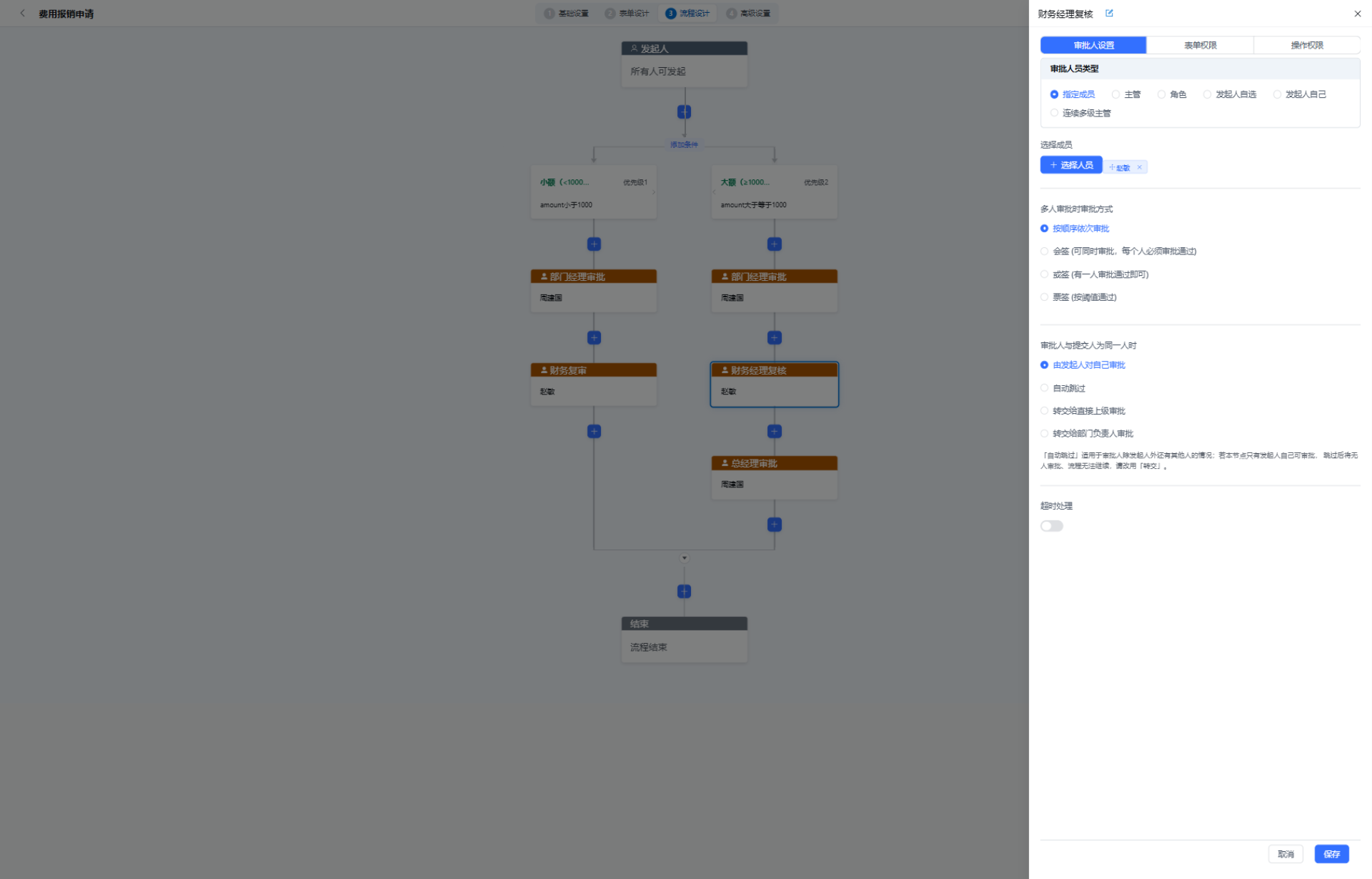
A WYSIWYG tree-style designer
Our in-house process designer: tree structure, node drawers, conditional branches with automatic default routes — business admins write zero code. The form designer is built on the same stack.
The whole engine is only 7 tables
Runtime and history archiving on separate tracks: in-flight data stays minimal, and reporting/audit queries hit the history tables without dragging down production. No relational maze — each table is self-explanatory at a glance.
The moment an instance finishes, its rows move from wf_instance / wf_task into wf_hi_* and record elapsed time and conclusions; the runtime tables only ever hold "in flight" rows, while the history tables take any index you need for reports — neither disturbs the other.
Top to bottom, all in-house
Designers, frontend app, approval engine and rule orchestration — four layers, all our own code, no black-box dependencies. Each layer stands on its own: the engine embeds into your system without gflow, and gflow never locks in your data.
Your first approval flow in three minutes
No middleware to install, no scaffolding to generate. Create the database, connect it, start an instance — you write business code, not workflow code.
"github.com/rulego/gflow-engine/config"
"github.com/rulego/gflow-engine/service"
)
// 1. Connect the database and the engine is live — 7 tables auto-provisioned
engine := service.NewWorkflowEngine("demo", &config.Config{
Database: &config.DatabaseConfig{
Driver: "postgres",
Dsn: "host=127.0.0.1 dbname=rulego_bpm ...",
},
})
engine.Start(ctx)
// 2. Deploy a process (the DSL is just a RuleGo rule chain)
engine.GetProcessService().Deploy(ctx, &model.WfProcess{
ProcessKey: "expense_approval",
Name: "Expense Approval",
DefinitionJSON: expenseDSL,
}, true)
// 3. Start an instance — form data goes into msg
engine.GetRuntimeService().StartProcessInstanceByKey(
ctx, identity, "expense_approval", bizKey, vars, false)
- The engine has zero external dependencies: the Redis lock and message notifications are both optional
- The DSL interoperates with the RuleGo ecosystem — rule chains can be reused directly as processes
- Unit tests run on an in-memory SQLite database, no real database needed
Open source is free, commercial pricing is clear
GFlow Engine is open source and free forever; the GFlow Workflow Platform is a limited-time 50% off at ¥7,500 (was ¥15,000) with source delivery — no annual subscription, no per-seat billing, no feature black boxes.
Enough reading — go stamp something
The demo environment is a complete production build: log in with admin / admin123 and walk from form design to the final approval stamp — you will know exactly what ¥7,500 buys.